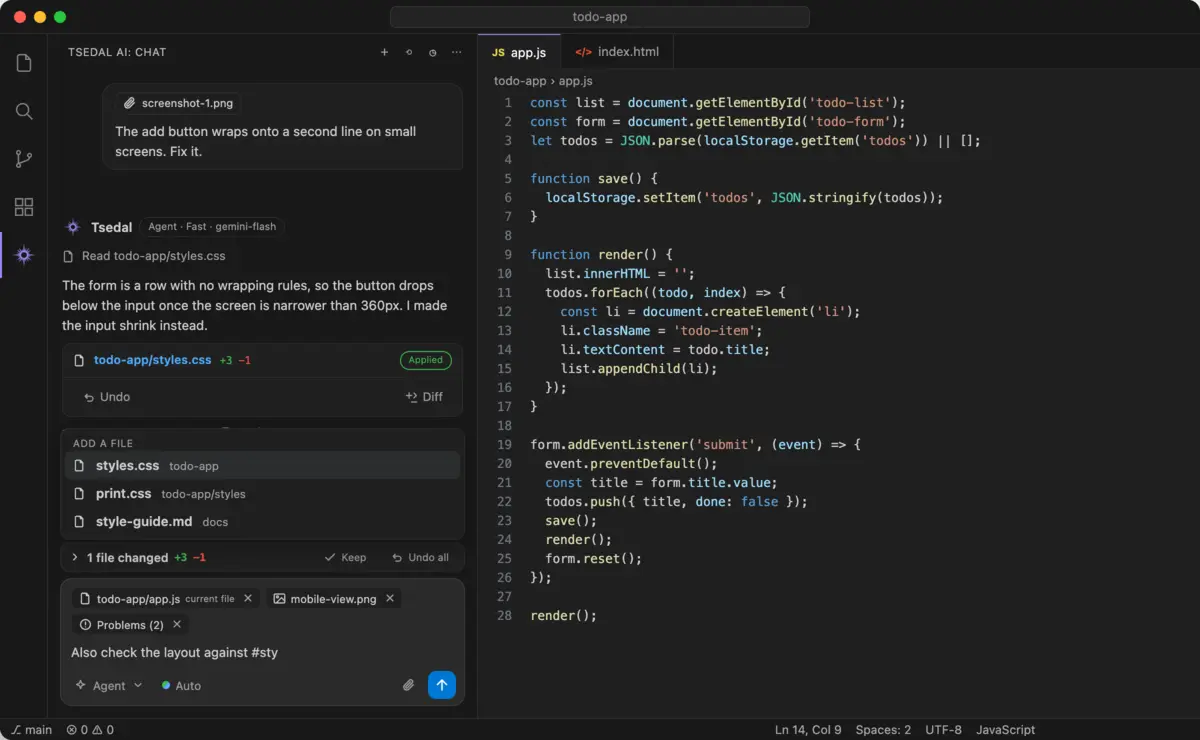
Ask, Plan and Agent
Questions, step-by-step plans and whole tasks, in one switch in the message box.
Visual Studio Code
The full Tsedal AI: Ask, Plan and Agent, autocomplete as you type, inline edits, MCP servers, web search and scheduled tasks. Also in VSCodium and other editors through Open VSX.
code --install-extension tsedal.tsedal-aiQuestions, step-by-step plans and whole tasks, in one switch in the message box.
Grey suggestions as you type, written for the code before and after your cursor. Tab accepts.
Select code, press Ctrl I and describe the change. On any error, the lightbulb offers Fix with Tsedal.
Connect databases, issue trackers and your own services, and approve each tool call.
Type /web for current docs and release notes, read after you allow it.
AGENTS.md for conventions, /init to write one, and your own slash commands in .tsedal/commands.
# attaches a file, @ attaches just one function or class, and screenshots and PDFs paste straight in.
See every change side by side, or put your files back to how they were before any message.
Run routine work on a timetable, in your project or on the server.
| Action | Windows and Linux | macOS |
|---|---|---|
| Open the chat | Ctrl L | ⌘ L |
| Edit the selection | Ctrl I | ⌘ I |
| Accept or reject an edit | Ctrl Enter / Ctrl Backspace | ⌘ Enter / ⌘ Backspace |
| Accept a suggestion | Tab | Tab |
| Stop the agent | Esc | Esc |
Requires a recent version of Visual Studio Code on Windows, macOS or Linux. VS Code keeps the extension up to date. Read the docs.
Start free. Move to Pro or Max, paid monthly in birr, when you need more.