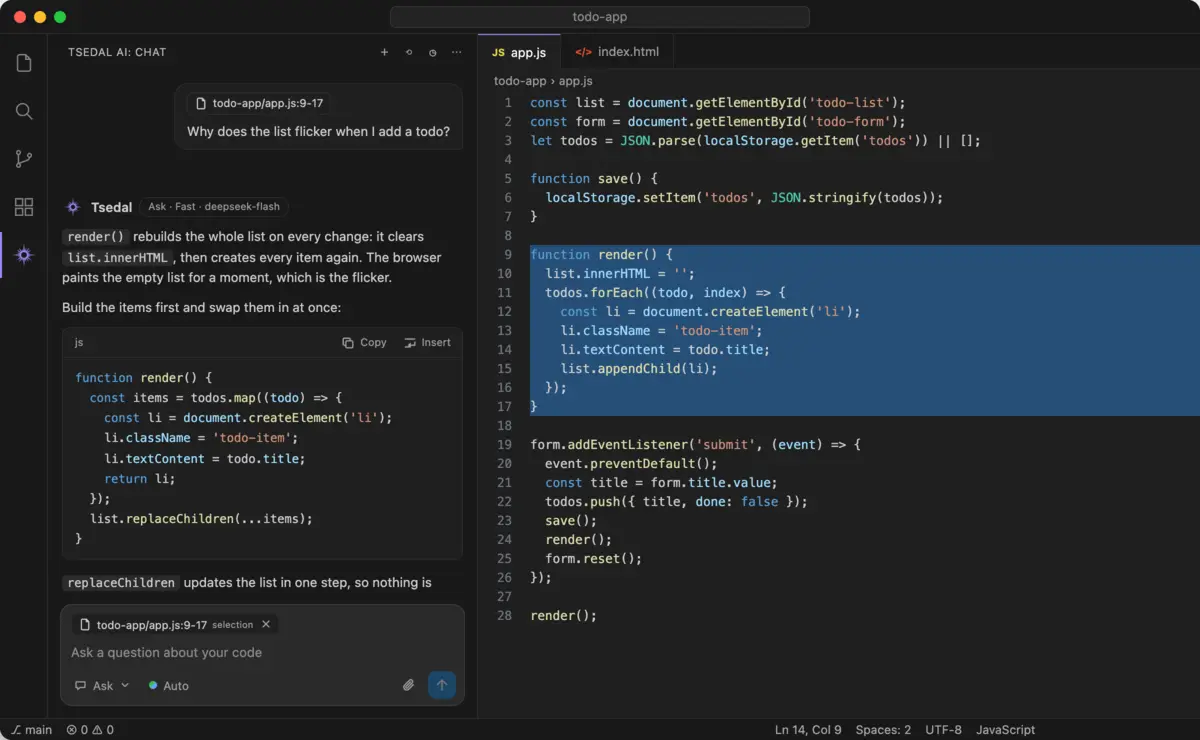
Ask about your own code
Ask reads and searches your project to answer, so you rarely need to attach files. Every code block has Copy and Insert, and file names open the file. If you ask for a change, Do this in Agent hands it over.
Ask modeAsk about your code, plan a change, or hand off the whole task and review every edit. In VS Code, Visual Studio and Eclipse, paid in birr.
Add Telebirr payments to checkout. Callbacks must be safe to replay.
Tsedal Plan · Smart
payments/ and the order model/webhooks/telebirr routeRisk: Telebirr can send the same callback twice. Step 4 stores each transaction id once.
Start building
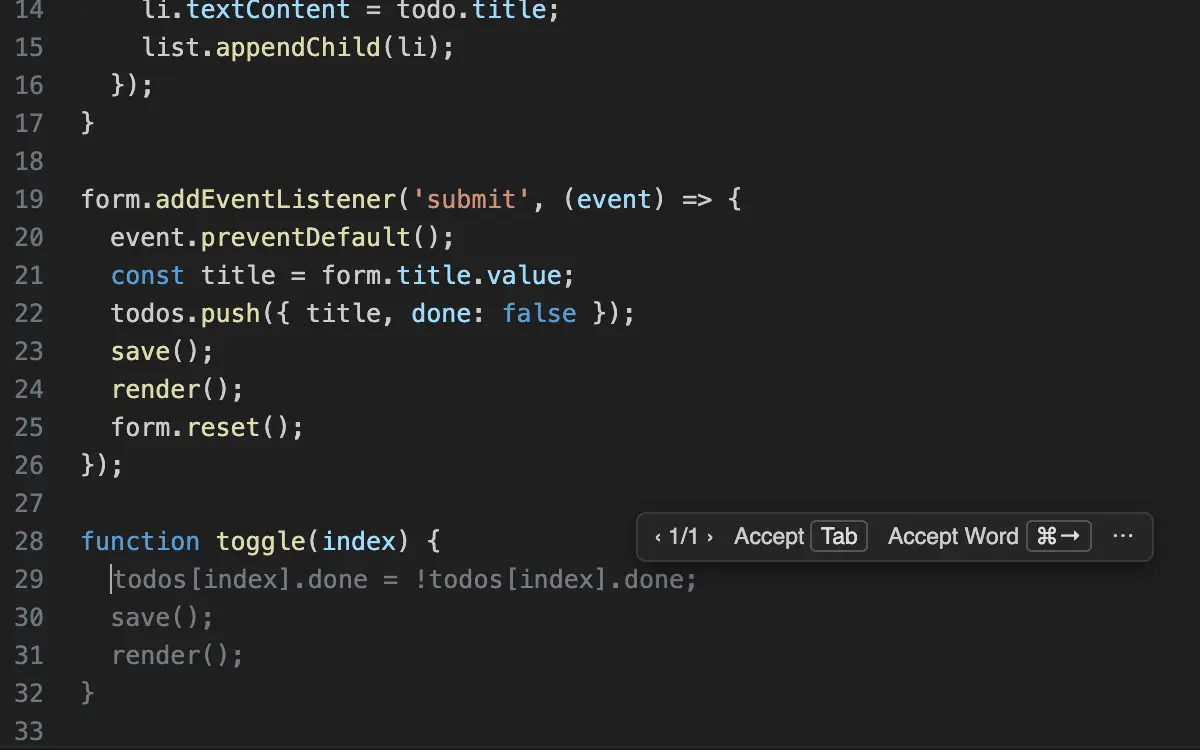
Ask, Plan and Agent, autocomplete as you type, MCP servers, web search and scheduled tasks. Also in VSCodium and other editors through Open VSX.
Install for VS Codecode --install-extension tsedal.tsedal-ai
Visual Studio 2022 and 2026 on Windows, for .NET and C++ work. Agent and Ask, project rules and web search.
Get the extensionAdd the update site and install, with Java 17 or newer. Agent, Ask and Plan, project rules, web search and your own slash commands.
Install stepshttps://tsedalai.com/eclipse/
VS Code Visual Studio Eclipse VSCodium JetBrainsAndroid StudioXcode
Trusted by developers at
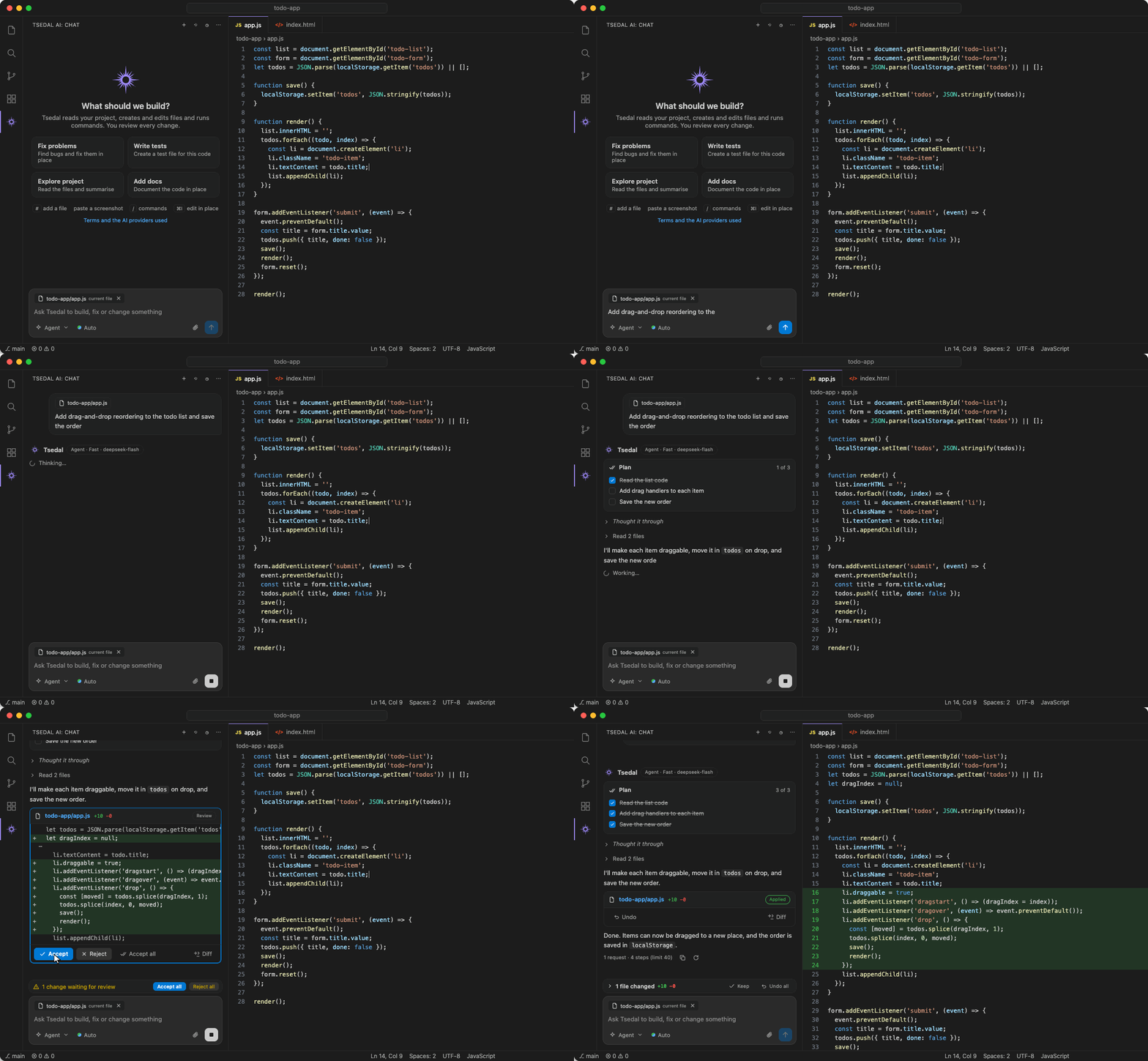
Describe the result. Tsedal plans, reads, edits and tests. Nothing is saved or run without you, and the whole task counts as one request.
A short checklist, ticked off as it goes. For big or unclear work, start in Plan mode and agree the approach first.
Searches files, finds where functions and classes are defined, and follows the rules in your AGENTS.md. Secret files are never read.
Diffs across as many files as the task needs. Accept, reject, or open them side by side. Review all shows every change in the chat.
Commands run only after you click Run. When a test fails, the agent reads the output and fixes it.
A summary of what changed. Undo any change, or Restore your files to how they were before any message.
Scroll to run the example. Click a step to jump to it.
Add 15% VAT to the cart total as its own line.
Tsedal example run
Ask reads and searches your project to answer, so you rarely need to attach files. Every code block has Copy and Insert, and file names open the file. If you ask for a change, Do this in Agent hands it over.
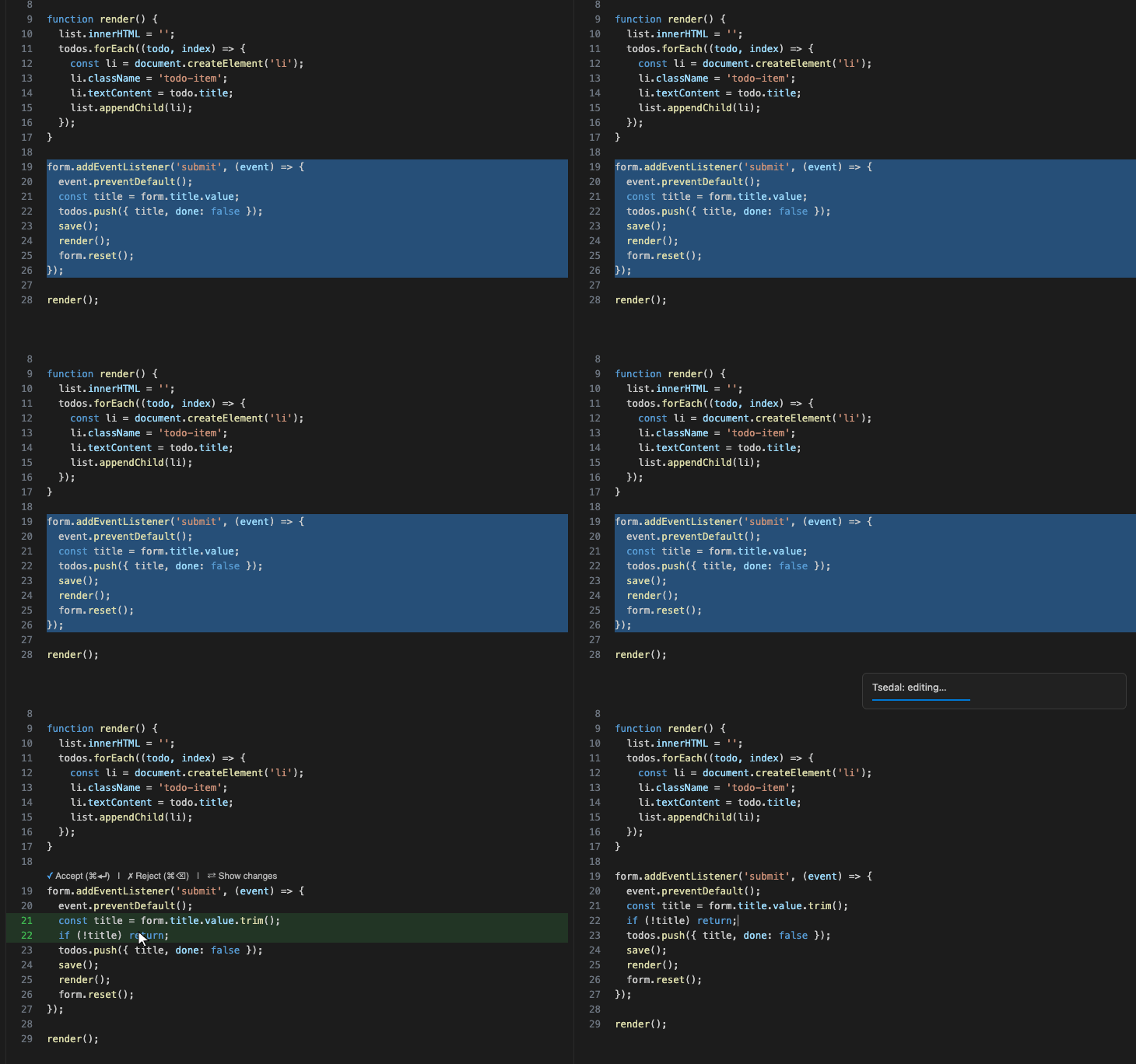
Ask modeSelect code, press Ctrl I and describe the change. The new code is highlighted in your editor; Ctrl Enter accepts it. On any error, click the lightbulb and choose Fix with Tsedal.
Inline editsFrontier models from eight labs, behind four simple levels. If one model is busy, the next takes over and the chat shows which one answered.
Leave it on Auto. Everyday work goes to Fast, small chores like commit messages to a lightweight model, and hard questions move up to Smart.
Every model and levelAuto picks for you: Fast for most work, Smart when a question looks hard.
The status bar shows your plan, a ring for the month and a bar per level for today, in plain words.
Put conventions and test commands in AGENTS.md and Tsedal follows them in Ask, Plan and Agent. Type /init and it writes a first version from your project.
Project rulesMCP servers bring in databases, issue trackers and your own services. You approve a project's servers once, and each tool call as it happens. In VS Code.
MCP serversWhen an answer depends on a new release, the agent searches and reads a page after you allow it. Searches don't use your requests: 30 a day on Free, 300 on paid plans.
Web searchAdd Markdown files to .tsedal/commands/ and deploy.md becomes /deploy. Commit the folder and your whole team gets the same commands.
Slash commandsPay a month at a time with Telebirr or a bank transfer. No international card, no dollar account, and plans never renew by themselves.
A whole agent task or plan counts as one request, however many files it reads or steps it takes. Failed steps aren't counted.
Prompts, code and answers are not kept. We record only that a request happened, which level answered and how large it was.
For trying Tsedal on real work.
0ብር
Start freeFor developers who code every day.
2,000ብር / month
Get ProFor heavy agent work, all day.
8,000ብር / month
Get MaxFor teams and companies.
Custom
Talk to usYour team shares one account with a key for each developer. We size the allowances and the price for your team, you pay by bank transfer with an invoice, and you get priority support.
Pay with Telebirr or a bank transfer through @tsedalAIsupport on Telegram. Plans last one month and never renew by themselves.
| Feature | Free | Pro | Max | Business |
|---|---|---|---|---|
| Ask, Plan and Agent on Fast | Included | Included | Included | Included |
| Agent on Smart and Max | A taste each month | Included | Included | Included |
| Daily allowances | Starter | Generous | About 2× Pro | Sized for your team |
| Max-level requests | A taste | Included | Several times Pro | Sized for your team |
| Attachments | Images | Images, PDFs, logs, code | Images, PDFs, logs, code | Images, PDFs, logs, code |
| Web searches a day | 30 | 300 | 300 | 300 |
| Autocomplete, AGENTS.md, MCP, slash commands | Included | Included | Included | Included |
| A key for each developer | — | — | — | Included |
| Invoices and priority support | — | — | — | Included |
| Prompts and code stored | Never | Never | Never | Never |
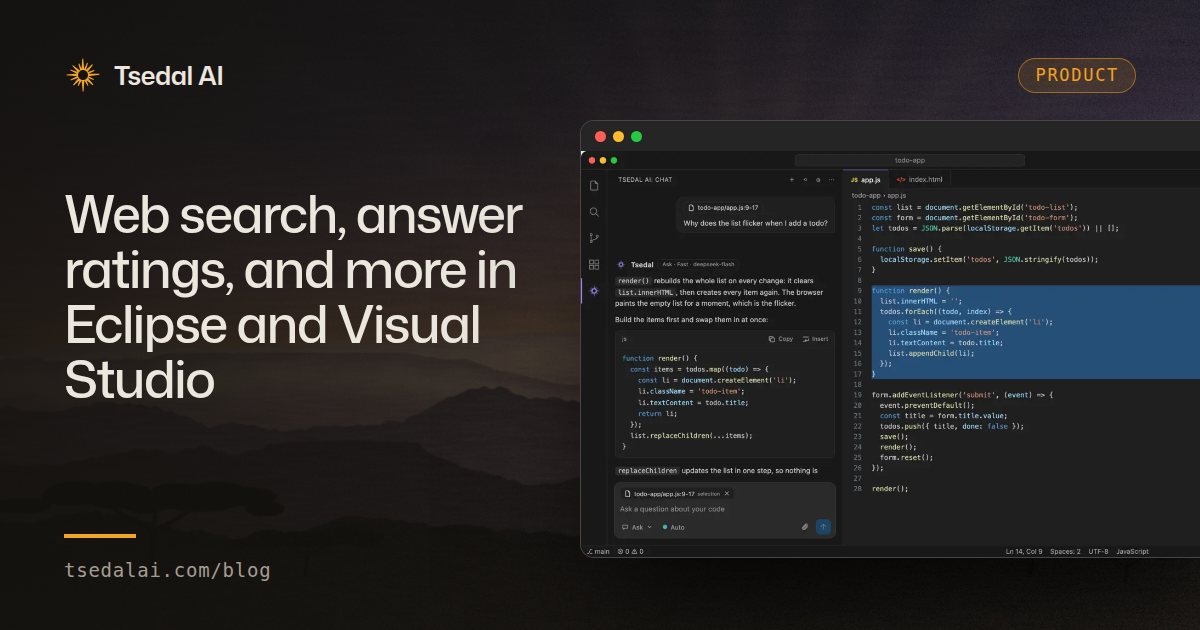 Web search, answer ratings, and more in Eclipse and Visual Studio
Web search: the agent can look up current documentation, release notes or an error message, and reads a page only after you allow it. In VS Code, type /web to…
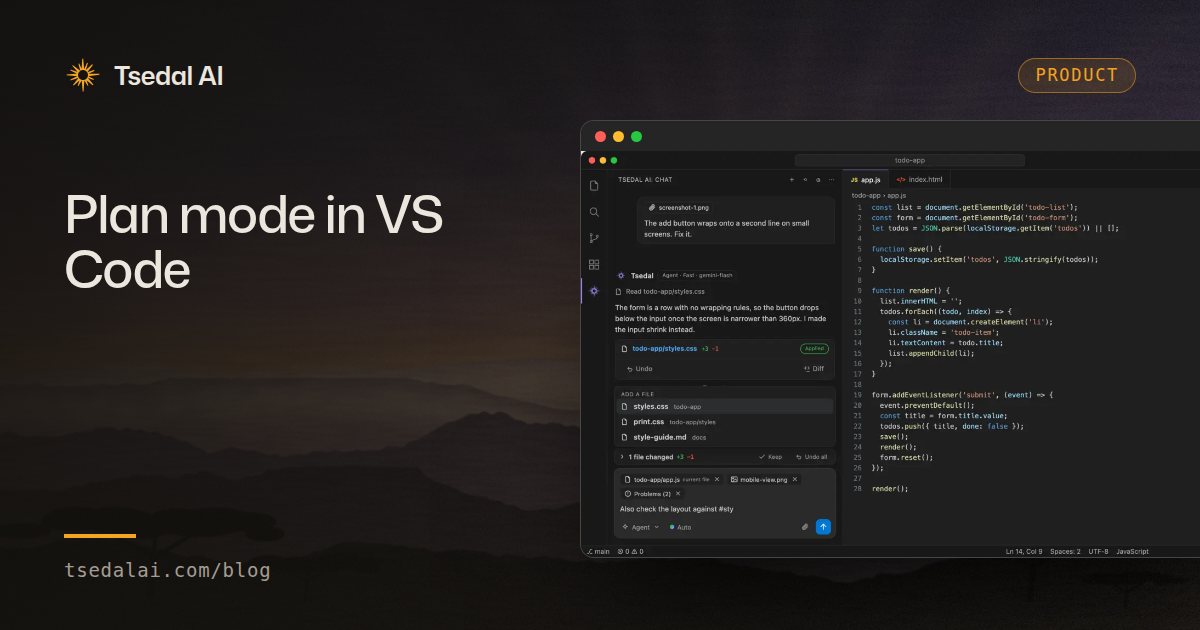 Plan mode in VS Code
Plan mode: Tsedal studies your project and writes a step-by-step plan, with the files, steps, risks and how to verify, without changing anything. It asks…
 GLM is now available in Tsedal AI
GLM from Z.ai is now part of Tsedal AI. Choose a level, and Tsedal sends each request to the model that suits it best.
Ask answers questions about your code and never changes your files. Plan studies your project and writes a step-by-step plan without changing anything; Start building hands it to Agent. Agent carries out a whole task: it reads your project, edits files, runs commands and tests, and keeps going until it's done.
Visual Studio Code (and VSCodium and other editors through Open VSX), Visual Studio 2022 and 2026, and Eclipse. JetBrains IDEs, Android Studio and Xcode are coming soon. See how to install.
Models from Anthropic (Claude), OpenAI (GPT), Google (Gemini), DeepSeek, Alibaba (Qwen), Z.ai (GLM), Moonshot AI (Kimi) and MiniMax. Auto matches each request to the model that suits it, and the lineup improves as new models are released.
Every change is shown as a diff you can accept or undo, commands run only after you approve them, and secret files such as .env are never read. Keep using version control as usual so you can always go back.
Tsedal AI is built in Addis Ababa, Ethiopia. Read more about us, write to support@tsedalai.com, or message @tsedalAIsupport on Telegram, and a person will answer.
Yes. Every account starts on Free, with daily allowances for autocomplete and Fast, a few agent tasks a day, and a taste of Smart and Max each month. Pro (2,000 ብር a month) and Max (8,000 ብር a month) give you much more.
Message @tsedalAIsupport on Telegram with the plan you want and your account email. We send Telebirr or bank details; once you've paid, we switch your account within a few hours. No international card needed. See how upgrading works.
Yes, Business. Your team shares one account with a key for each developer, and we size the allowances and price for your team. You pay by bank transfer with an invoice and get priority support. Talk to us.
Plans are paid one month at a time and don't renew by themselves. When your month ends, your account moves back to Free; nothing is lost. To continue, pay for another month the same way. Payments are not refundable.
You see when it resets, and you can keep working at another level meanwhile. A whole agent task or plan counts as one request, however many steps it takes.
Yes, with one exception: if the shared monthly budget is nearly used up, Max requests may run on Smart for a while. The extension always shows which level answered.
No. We don't keep your prompts, your code or the answers. For each request we record only that it happened, which level answered and how large it was. Read the terms and privacy.
Images and PDFs you attach are kept for up to 30 days so later steps of a task can use them, then deleted. Files pasted into a single message are not kept.
Only the search words are sent to our search provider, never your code. The extension opens pages from your computer, after you allow it.
The rating, an optional reason, and the mode, level and model that answered. Never your conversation or code.
Free account
Get a free account in a minute. Upgrade to Pro or Max whenever you need more.
Questions? Ask the team at support@tsedalai.com and in the Tsedal AI Telegram group.
ፀዳል
ፀዳል (tsedal) is Amharic for radiance. We're building Tsedal AI in Addis Ababa so developers in Ethiopia get the same frontier AI as anyone, priced in birr.
About us