Review every change
Each edit arrives as a diff. Accept or reject it, or open it side by side. Review all shows every change in the chat at once.
Agent mode
Describe the result you want. Tsedal plans the work, reads your project, edits files across it, runs your tests and fixes what fails. You approve what matters, and the whole task counts as one request.
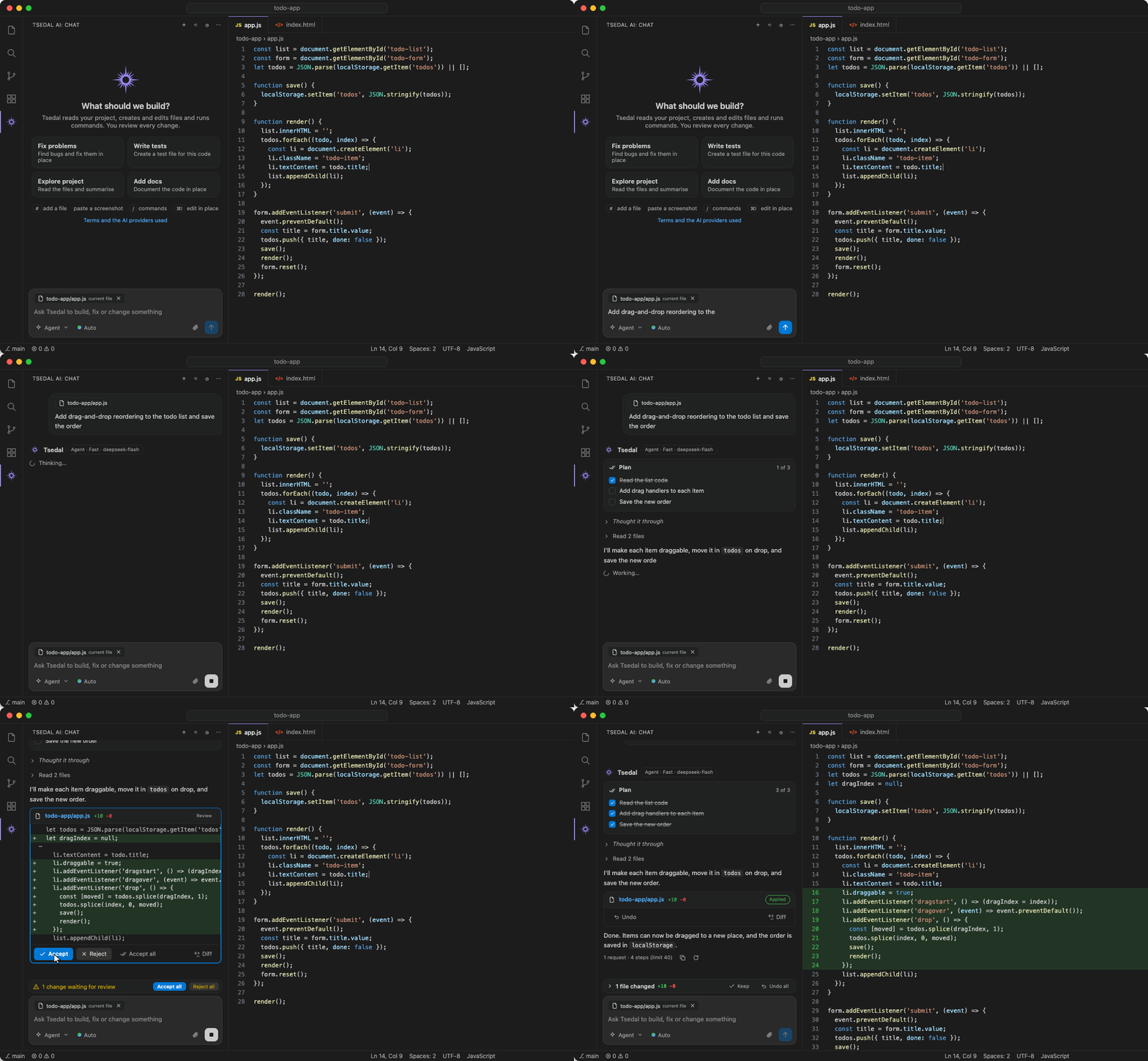
Each edit arrives as a diff. Accept or reject it, or open it side by side. Review all shows every change in the chat at once.
Tests, builds and other terminal commands run only after you click Run. MCP tool calls and web pages wait for your approval too.
Undo one change or all of them. Restore on any of your messages puts your files back to how they were before it.
The agent works only inside the project you have open, and never reads or changes .env files, private keys or certificates.
Paste an error screenshot or drop in a spec. Type # for a file, or @ for a single function or class in VS Code.
Put conventions and test commands in AGENTS.md and every task follows them. Type /init for a first version.
When a task depends on a new release, the agent searches the web and reads a page after you allow it.
However many files it reads or steps it takes, an agent task counts once against your allowance. Steps that fail aren't counted, and a task that nears its step limit warns you first, then stops with a Start a new task button.
Start free. Move to Pro or Max, paid monthly in birr, when you need more.